What It Is
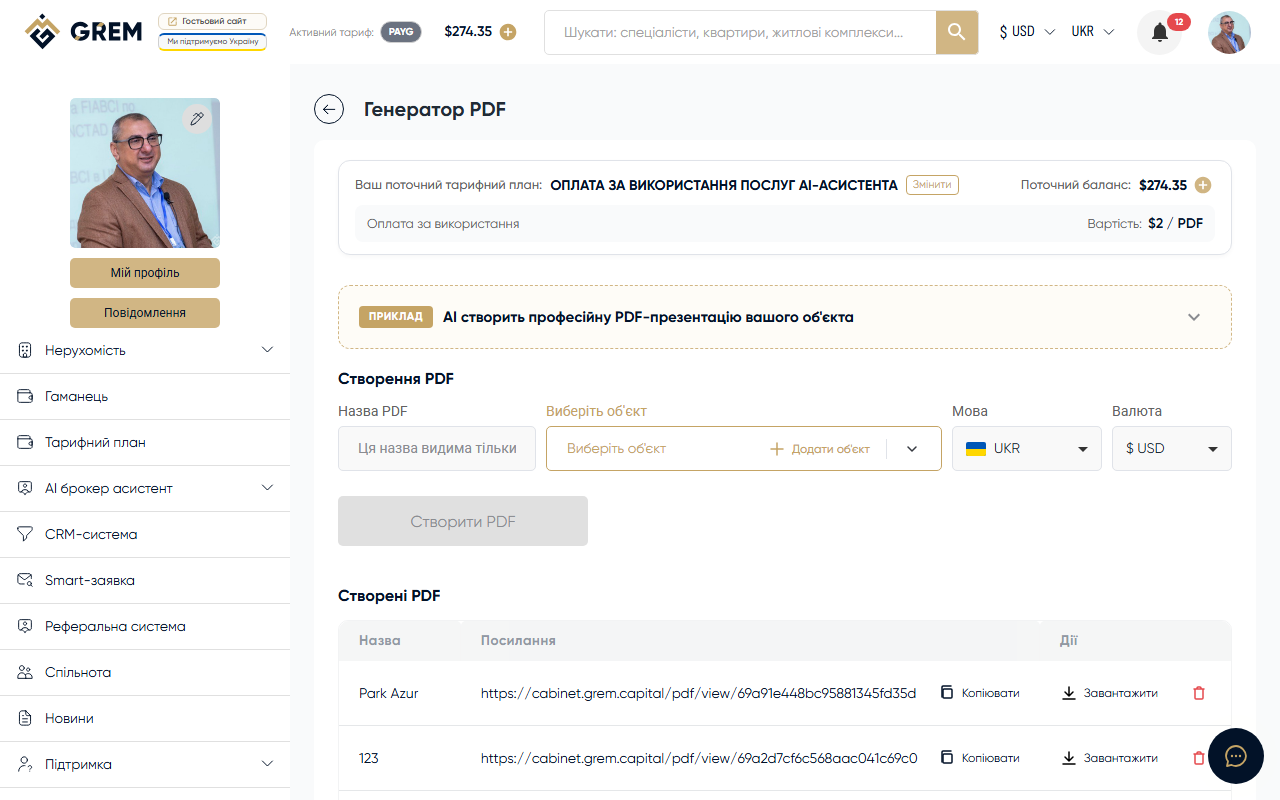
The PDF Generator creates professional PDF documents for properties. The finished file can be sent to a client, printed, or posted on a website.
Features
- Generate professional PDFs with photos, descriptions, specifications, and pricing
- Select a property from your catalog using a convenient picker
- Customize content: choose which sections to include and which text to use
- Edit the description before generating
- Public link for sharing the finished PDF
- Currency support: USD, UAH, EUR, AZN
- 6 generation languages
How to Use
Creating a PDF
- Go to Tools > PDF Generator in the dashboard
- Select a property from your catalog
- Customize the content: choose sections, language, currency
- Edit the description text if needed
- Click "Generate"
Checking the Status
Generation takes 10 to 60 seconds. The system automatically polls the server to check readiness. When the PDF is ready, a download button appears.
Downloading and Sharing
After generation, the following actions are available:
- Download — save the PDF to your device
- Share — copy the public link to send to a client
- Preview — open the PDF in your browser
Document Management
All created PDFs are saved in a list. You can:
- Browse the list of all generated documents
- Download previously created PDFs
- Delete documents you no longer need
Availability
| Platform | Path | Status |
|---|---|---|
| Dashboard (web) | Tools > PDF Generator | Full support |
| Mobile app | "AI" section | In development |
Before generating, make sure the property has a filled-in description and quality photos. This directly affects the quality of the PDF document.
Pricing
Funds are deducted from your GREM wallet balance for each generation. More details: pricing plans.