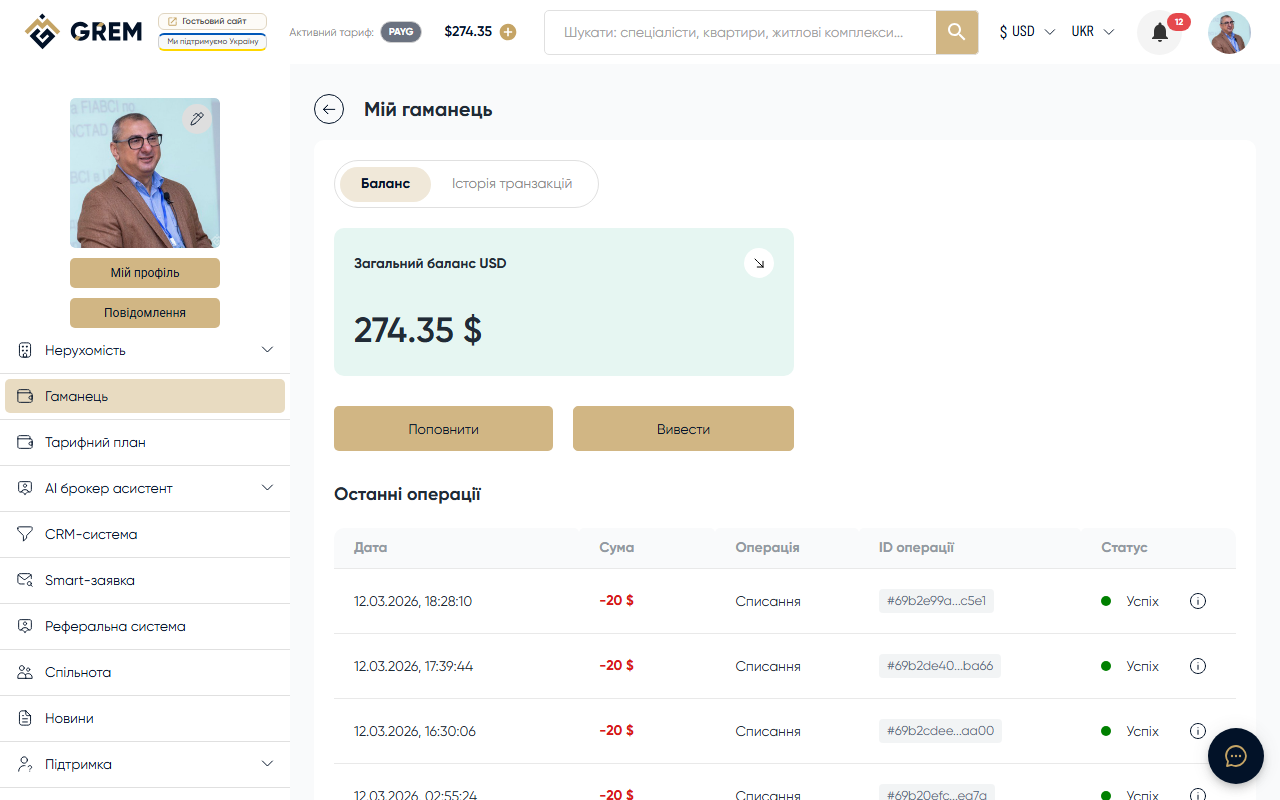
What is the GREM Wallet
The wallet is the internal payment system of GREM Capital. All charges for AI tools, subscriptions, and other platform services are deducted from it. Every operation goes through the wallet: top-ups, payments, refunds, and withdrawals.
The wallet is available in the "Wallet" section of your dashboard.
Balance
The wallet displays your total balance in US dollars (USD). This balance is used for all platform operations: AI tool payments, subscriptions, publications, and more.
The wallet page has two tabs:
- Balance — your current balance with "Top Up" and "Withdraw" buttons
- Transaction History — a list of all operations
Key Operations
Top-Up
You can top up your balance using a bank card. Choose the amount, enter your card details in the dialog, and confirm the payment.
Learn more: Top Up Balance
Service Charges
When using AI tools, a pre-reservation billing model applies:
- The system reserves the amount on your balance
- Once the operation completes, the funds are charged
- If the operation fails, the reserved amount is returned
Learn more: Pay-as-you-go
Subscriptions
Subscription plans provide monthly quotas for tool usage. The subscription fee is charged monthly from your wallet balance.
Learn more: Plans and Pricing
Withdrawal
You can withdraw funds from your balance. Withdrawal requests are reviewed by an administrator.
Learn more: Withdrawal
Where to Check Your Balance
- Dashboard: the wallet icon in the top bar shows your current balance. Click it to go to the wallet page
- Mobile app: the balance is displayed in your profile and on the home screen
Your balance updates in real time. After a top-up or charge, you immediately see the updated amount.
Transaction History
All wallet operations are stored in the transaction history. The most recent operations appear first.
Learn more: Transaction History