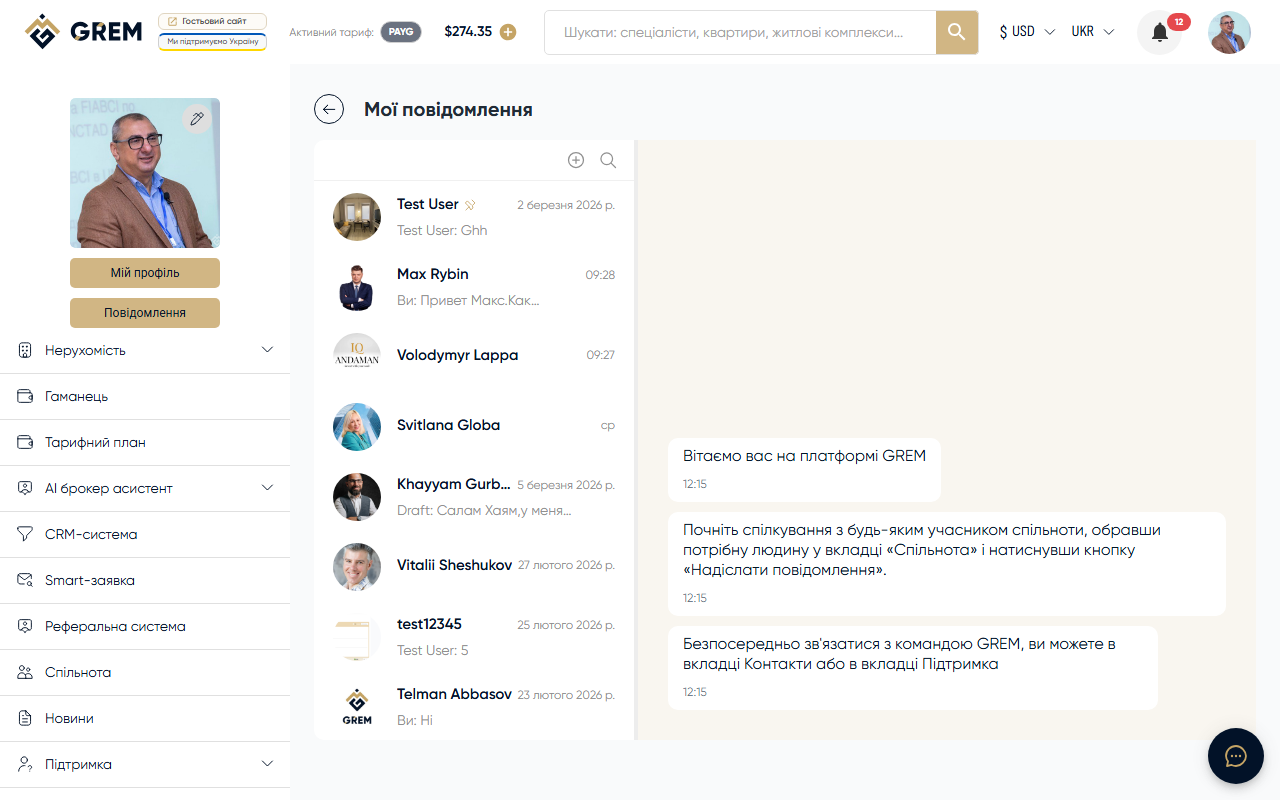
What is the GREM Messenger
The messenger is a built-in messaging system on the GREM Capital platform. It works in real time. The messenger is available in the "Chat" section of your dashboard.
Chat Types
The messenger supports two types of chats:
| Type | Description |
|---|---|
| Direct | Chat between two users |
| Group | Chat with multiple participants |
Learn more: Direct Chats and Group Chats
Message Types
| Type | Description |
|---|---|
| Text | Regular text message |
| Audio | Voice message |
| Video circle | Round video message |
| File | File attachments (documents, images) |
| System | Automatic message about chat events |
Learn more: Media and Files
Chat List
The left panel of the messenger displays a list of all chats:
- Chats are sorted by the time of the last message (newest first)
- Pinned chats always appear at the top
- Each chat shows: avatar, name, last message, and time
- Unread chats have a badge with the number of new messages
Real-Time Connection
The messenger uses a persistent connection to the server to provide:
- Instant message delivery
- Typing indicator
- Message read status
- Chat list updates without page reload
The connection is established automatically when you log into the dashboard. If the connection is lost, the system reconnects automatically.
Key Features
- Create direct and group chats
- Send text, audio, video circles, and files
- Edit and delete messages
- Message reactions (emoji)
- Reply to and forward messages
- Search messages within a chat
- Pin, archive, and mute chats
Quick Start
- Go to the Chat section in your dashboard
- Click the new chat button
- Select a contact or create a group
- Start messaging
Learn more about settings: Chat Settings