What Is Rental on GREM
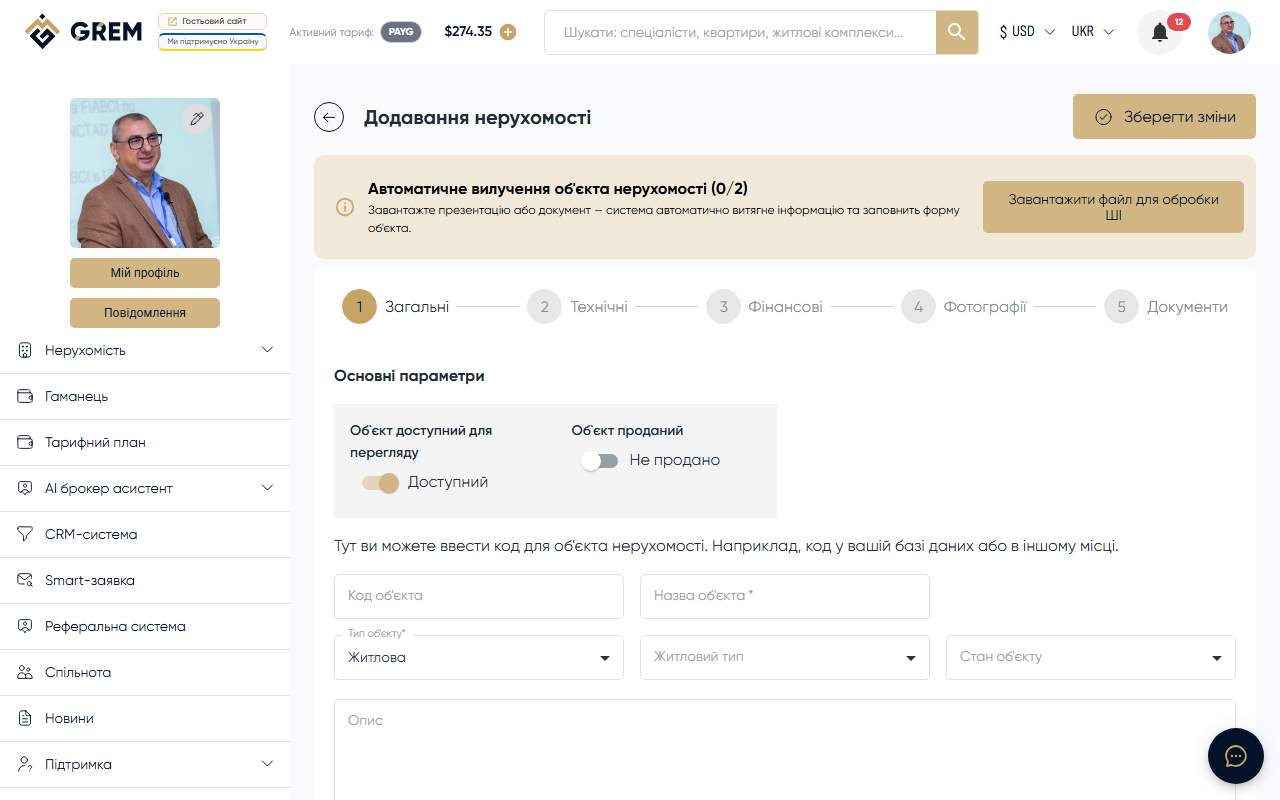
In addition to sales, the GREM Capital platform allows you to list properties for rent. Rental is a separate section with its own creation form, filters, and catalog.
Rental is available for the following roles: Broker, Seller, Management Company.
Two Rental Types
| Type | Description | Pricing |
|---|---|---|
| Long-term | Rental for months or years | Monthly rate + deposit |
| Short-term | Daily rental, vacation stays | Price per night |
The rental type is selected when creating a listing and determines the set of fields to fill in.
Creating a Rental Listing
Step 1: Basic Information
- Property type: Residential, Commercial, or Industrial
- Subtype (for Residential): Flat, Apartments, House, Condo, Townhouse, Villa
- Subtype (for Commercial): All-purpose, Office, Retail, Hotel
- Subtype (for Industrial): Factory, Warehouse, Hangar, Complex
- Property title
- Country and city (required)
- Address with map location
Step 2: Specifications
- Property condition
- Area, number of rooms, bedrooms
- Floor and total number of floors
- Window view
- Furniture (yes/no) and furniture list
- Utility systems
- Amenities and additional on-site amenities
- Balcony
- Layout
Step 3: Photos and Video
- Upload property photos (minimum 1 for publishing)
- Add video (optional)
Step 4: Price and Terms
Fields depend on the rental type:
Long-term rental:
- Monthly rate
- Deposit
- Currency (USD, UAH, EUR, AZN)
- Minimum rental period
Short-term rental:
- Price per night
- Currency
- Minimum stay
- Check-in time (default 15:00-18:00)
- Check-out time (default 08:00-11:00)
- Payment methods: on arrival, online, bank transfer
- Reporting documents (yes/no)
For both types:
- Children allowed (yes/no)
- Pets allowed (yes/no/by arrangement)
Step 5: Contact Information
- Phone
- Messengers: WhatsApp, Telegram, Viber
Rental Listing Statuses
Rental statuses are similar to property sale statuses:
| Status | Description |
|---|---|
| Draft | Saved but not published |
| Moderation | Submitted for review |
| Active | Published in the catalog |
| Rejected | Rejected by moderator |
| Rented | Property has been rented |
| Inactive | Temporarily hidden |
| Deleted | Permanently deleted |
For publishing, a listing must pass moderation. Required fields: property type, title, address (country and city), price, minimum 1 photo.
Archiving
You can archive rental listings that are temporarily irrelevant. Archived listings are stored separately and can be restored at any time.
Archiving is not available for drafts, listings in moderation, and listings being processed.
Search and Filters
The rental catalog includes filters for:
- Title
- Country and city
- Price range
- Number of rooms
- Area
- Floor
- Year built
- Furniture (yes/no)
- Balcony (yes/no)
Where to Find It
| Platform | Path |
|---|---|
| Dashboard (web) | "Real Estate" section > "Rental" tab |
| Catalog | Rental section on grem.capital |
For short-term rentals, be sure to specify check-in and check-out times, as well as available payment methods — this significantly improves listing quality.