What is CRM in GREM
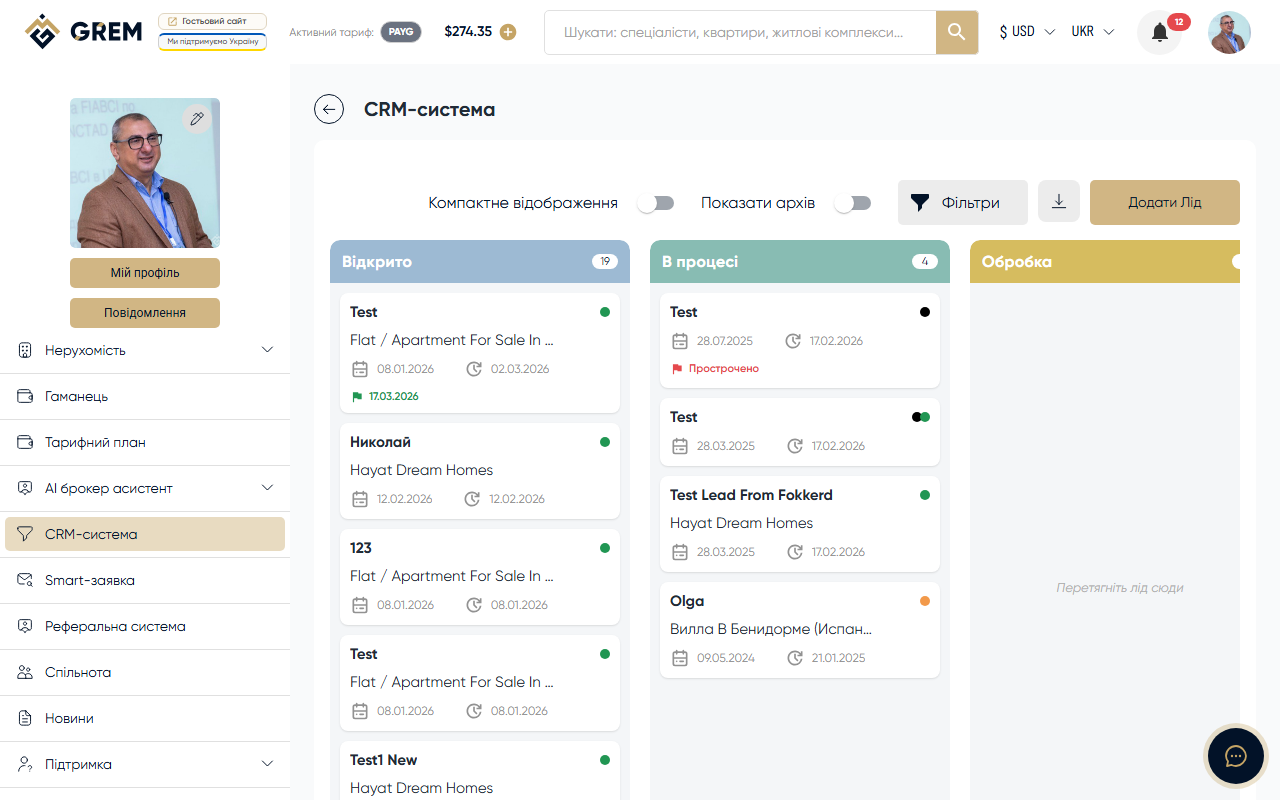
The GREM Capital CRM system is built around a visual board. It allows brokers, sellers, and developer companies to track leads, monitor deals, and manage the real estate sales pipeline.
The CRM is available in the "CRM" section of your dashboard.
Pipeline Stages
Each lead goes through 7 stages:
| Stage | Description |
|---|---|
| New | New lead, just created or received |
| In Progress | Lead is being worked on, communication is underway |
| Processing | Processing documents or deal details |
| Approval | Negotiating terms with the client |
| Completed | Deal completed successfully |
| Non-Target | Lead turned out to be non-target |
| Lost | Deal fell through |
Leads are moved between stages by dragging them on the visual board.
Who Has Access
The CRM is available to three roles on the platform:
- Broker — the primary CRM user, manages leads and closes deals
- Seller — a property seller, receives leads from brokers
- Developer Company — manages leads for their properties
Lead Types
The system supports 3 lead types:
- Own — a lead created manually by the broker
- Contract — a lead linked to a specific property
- Transfer — a lead transferred to another broker
Lead Sources
Leads enter the CRM from four sources:
- Own — created manually via the dashboard
- New Build — linked to a new build property
- Real Estate — linked to a real estate listing
- Transfer — received from another broker
The lead source is determined automatically based on how the lead was created and the type of linked property.
Quick Start
- Go to the CRM section in your dashboard
- Click "Create Lead" to add a new lead
- Fill in the required fields: client name, phone number, and budget
- Drag leads between columns to change their stage
Learn more about working with leads: Lead Management
Learn more about the visual board: Sales Pipeline