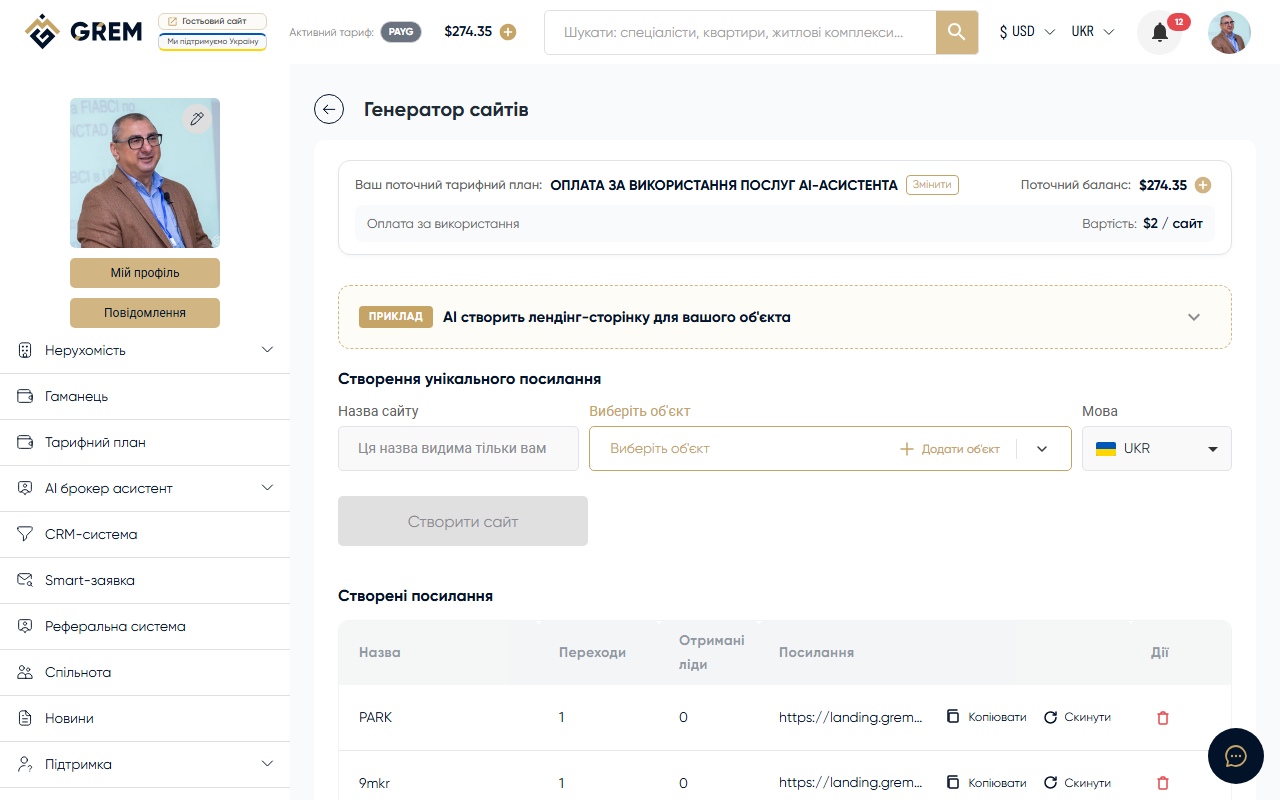
What It Is
The Site Generator automatically creates individual marketing pages (landing pages) for your properties. Each landing page has a unique short URL, photo gallery, description, contact form, and visit statistics.
Features
- Automatic generation of a full page from property data
- Photo gallery with all property images
- Virtual tours (if available)
- Contact form for collecting leads with spam protection
- Short URL for easy sharing
- Analytics: view and click counts
- Manage all created landing pages from one place
How to Use
Creating a Site
- Go to Tools > Site Generator in the dashboard
- Select a property
- Click "Generate site"
- The system creates a landing page and provides a short URL
Managing Landing Pages
In the list of all created sites, you can:
- View — open the landing page in a new tab
- Copy link — for sending to a client or posting on social media
- View statistics — view and click counts
- Reset statistics — reset the counters
- Delete — deactivate the landing page
Contact Form
Each landing page includes a public form for visitors. Potential buyers or tenants leave their contact details, and you receive them as leads.
Spam protection:
- Invisible automatic verification
- Hidden honeypot field for bots
- Submission rate limiting from a single address
Leads from the contact form arrive in your dashboard. Check the leads section regularly so you don't miss interested clients.
Availability
| Platform | Path | Status |
|---|---|---|
| Dashboard (web) | Tools > Site Generator | Full support |
| Mobile app | "AI" section | In development |
Pricing
Funds are deducted from your GREM wallet balance for each created landing page. More details: pricing plans.
Use short URLs for posting on social media, in messengers, and on business cards. The analytics will help you understand which channel brings the most views.