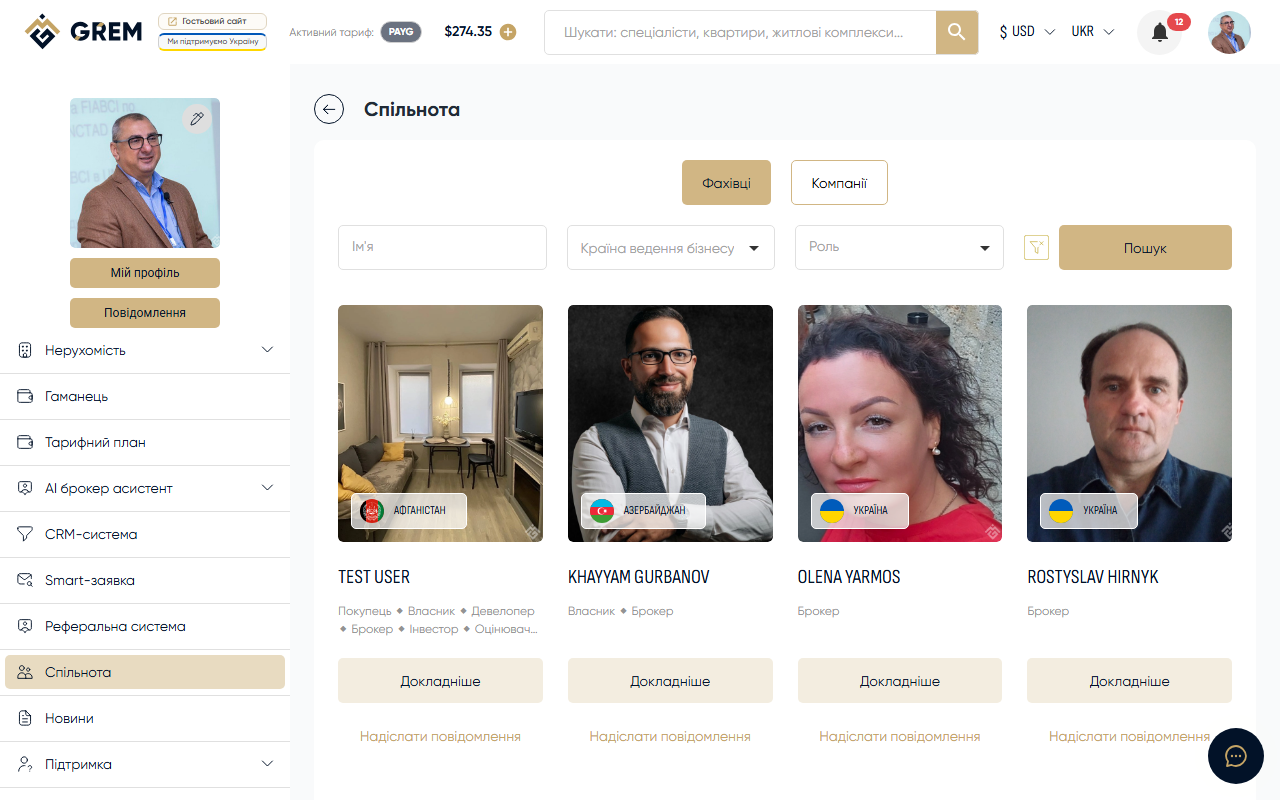
Roles on the GREM Platform
A role determines which platform features are available to your profile. You choose a role when creating your community profile in the "Community" section. A single profile can have multiple roles at the same time.
All roles are divided into three groups: individual, company, and special.
Individual Roles
These roles are available to individuals.
Buyer
A role for those looking to buy or rent property.
- Search properties with filters
- Save properties to favorites
- Submit viewing requests
- Receive Smart applications
Owner
For owners who want to sell or rent out their property.
- Create and manage your own properties
- Publish listings on the platform
- Access the CRM system for lead management
- Receive inquiries from buyers and brokers
Broker
The primary role for professional real estate agents. Unlocks the widest set of tools.
- Access the CRM system for client management
- Create property listings (sale and rental)
- Manage leads and deal pipeline
- Commission-sharing contracts
- Publish properties on the platform
Before creating properties, a broker must sign the Commission Agreement once in the "Commission Agreement" tab in profile settings. Learn more: How to Add Your First Property.
Investor
For real estate investors.
- Search properties with investment filters
- Access property appraisal tools
- Analyze investment attractiveness of properties
Appraiser
For professional property appraisers.
- Access property appraisal features
- Conduct and publish appraisal results
- Work with comparative analyses
Developer
An individual role for property developers. Functionality similar to Developer Company, but for individuals.
- Create complex properties (residential complexes)
- Manage development projects
- Publish properties on the platform
Architect
For architects and designers.
- Public architect profile
- Participation in development projects
Notary
For notaries working with real estate transactions.
- Public notary profile
- Participation in the deal execution process
Companies
Roles for legal entities and organizations.
Developer Company
For construction and development companies.
- Create complex properties (residential complexes)
- Manage development projects
- Extended corporate profile
- Publish properties on the platform
- Access the CRM system for lead management
Management Company
For property management companies.
- Corporate profile on the platform
- Manage property portfolio
Commercial Company
For companies working with commercial real estate.
- Corporate profile on the platform
- Work with commercial properties
Public Organization
For public organizations related to the real estate market.
- Public organization profile on the platform
Special Roles
Roles with a specific purpose on the platform.
Investment Fund
For investment funds working with real estate.
- Extended corporate profile
- Search properties for the fund's portfolio
Manager
A role for platform managers.
- Manage processes on the platform
- Coordinate work between participants
Expert
For consultants and real estate market analysts.
- Public expert profile
- Receive consultation requests
Support
A role for the platform support service.
- Handle user inquiries
- Assist with platform-related questions
Title
A specialized role for working with property rights and title documents.
Key Features Comparison
| Feature | Broker | Owner | Developer / Developer Company | Investor | Appraiser | Buyer |
|---|---|---|---|---|---|---|
| Create properties | Yes | Yes | Yes | No | No | No |
| Create residential complexes | No | No | Yes | No | No | No |
| CRM access | Yes | Yes | Yes (Developer Company) | No | No | No |
| Lead management | Yes | Yes | Yes (Developer Company) | No | No | No |
| Commission contracts | Yes | No | No | No | No | No |
| Appraisal tools | No | No | No | Yes | Yes | No |
| Search and favorites | Yes | Yes | Yes | Yes | Yes | Yes |
| Smart applications | Yes | Yes | Yes | Yes | Yes | Yes |
How to Choose and Change a Role
A role is set in the community profile. You can have multiple roles at the same time — for example, Broker + Investor. Each additional role expands the available features.
To change or add a role, go to your community profile settings and select the desired roles from the list.
Changing a role may affect access to certain features. For example, if you remove the Broker role, you will lose access to the CRM.