Available Plans
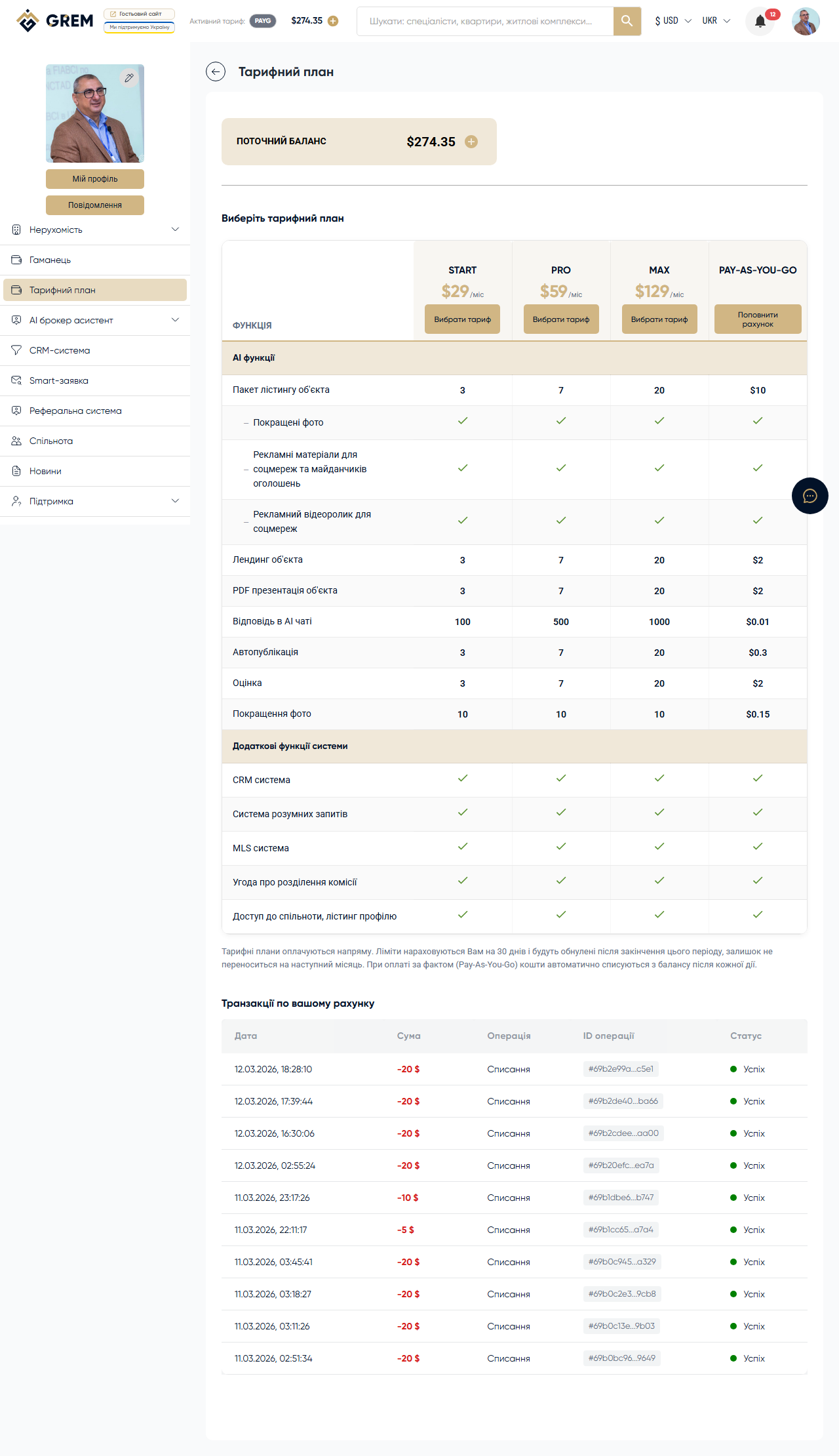
GREM Capital offers several subscription plans. Each plan defines monthly quotas for AI tool usage. A Pay-as-you-go mode (pay per use) is also available.
Plans
On the plans page, you will see the current plans with their prices and quotas:
- Pay-as-you-go (PAYG) — no subscription, pay for each use
- Start — entry-level plan with basic quotas
- Basic — expanded plan for regular use
- Pro — professional plan with large quotas
- Max — maximum plan for power users
Exact prices and quotas for each plan are displayed on the plans page in your dashboard. They may be updated, so always check the latest information on the platform.
How to Choose a Plan
Go to AI Broker Assistant > Subscription Plan in your dashboard. Select the plan you need and click the selection button. Payment is processed via Stripe.
If none of the fixed plans suit you, use the Pay-as-you-go mode — pay only for actual usage.
Subscription Statuses
A subscription can have one of three statuses:
| Status | Description |
|---|---|
| active | Subscription is active, quotas are available |
| cancelled | Subscription is cancelled but remains active until the end of the paid period |
| grace | Grace period after a failed charge. The subscription is still active but requires payment |
Automatic Renewal
The subscription renews automatically on the expiration date of the current period. The system charges the plan cost from your wallet balance. If the balance is insufficient, the subscription enters the grace status.
Make sure your balance has enough funds before the renewal date. You can top up at any time: Top Up Balance.
Changing Plans
Upgrade
Switching to a higher plan takes effect immediately. The price difference is charged from your balance, and quotas are updated.
Downgrade
Switching to a lower plan is scheduled for the end of the current period. Until then, you continue using your current plan with all its quotas.
Cancelling a Subscription
You can cancel your subscription at any time. After cancellation, the plan remains active until the end of the paid period. Quotas are not revoked immediately.
After the paid period of a cancelled subscription ends, unused quotas expire. Switching to Pay-as-you-go lets you continue working without a subscription.