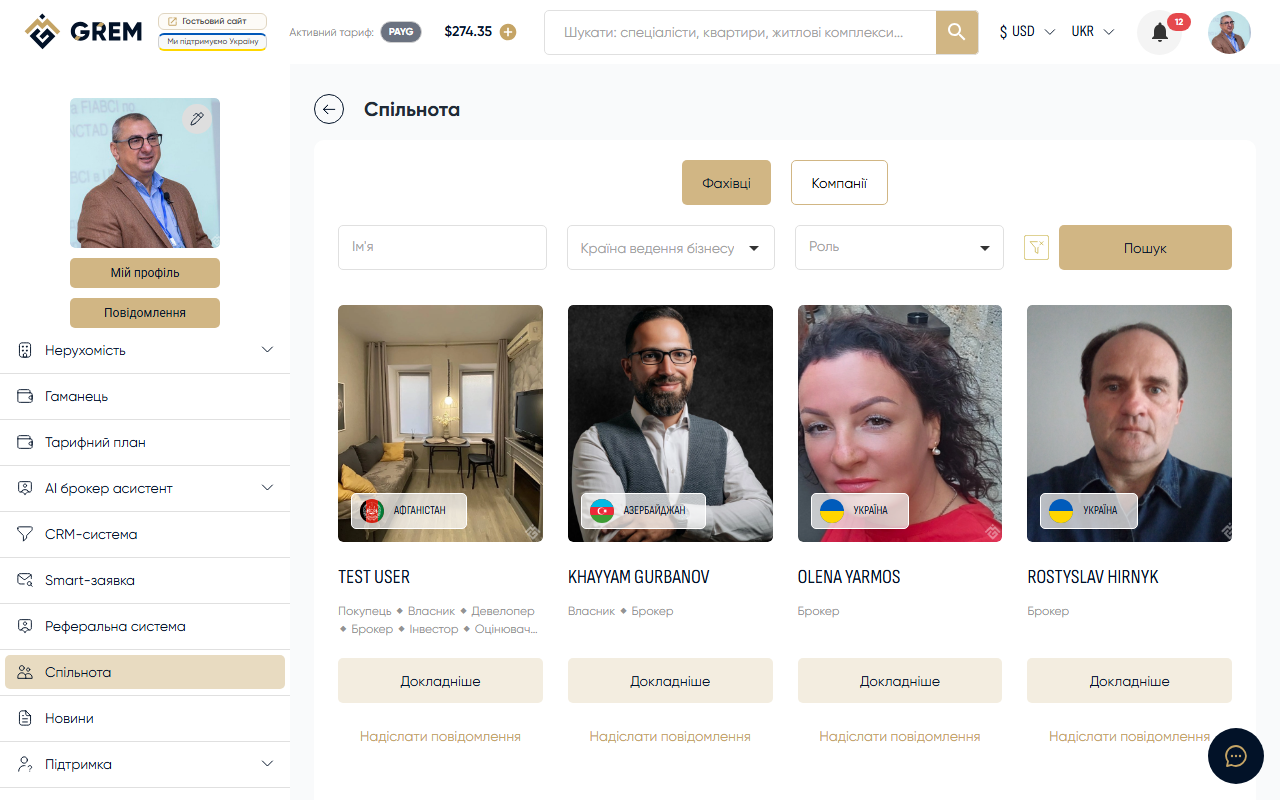
What is the GREM Community
The GREM Capital platform has a "Community" section where real estate professionals create public profiles, showcase portfolios, and find partners. Each member chooses one or more roles that determine access to platform features.
Available Roles
Individual Roles
| Role | Description |
|---|---|
| Buyer | Property buyer |
| Owner | Property owner |
| Broker | Real estate broker, access to CRM and property creation |
| Investor | Real estate investor |
| Appraiser | Property appraiser |
| Developer | Property developer, complex projects |
| Architect | Architect |
| Notary | Notary |
Companies
| Role | Description |
|---|---|
| Management Company | Property management company |
| Commercial Company | Commercial company |
| Developer Company | Real estate developer company |
Organizations
| Role | Description |
|---|---|
| Public Organization | Public organization |
Additional Roles
| Role | Description |
|---|---|
| Investment Fund | Real estate investment fund |
| Manager | Real estate manager |
| Expert | Market expert, consultant |
| Support | Platform support service |
Learn more about each role: Community Roles.
Profile Features
- Public card with photo, specialization, and experience
- Portfolio with files and documents
- Education, licenses, and certificates
- Profile verification through document upload (identity check) to receive a trust badge
- Profile completeness indicator
Where to Find the Community
The community is available in your dashboard:
- Member list — "Community" section in the main menu
- Member profile — click on any member's name or photo in the list
- Edit profile — "My Profile" section, "Community" tab
Getting Started
- Go to the "Community" section in your dashboard
- Create a profile by selecting a role and filling in basic details
- Add a portfolio and documents
- Complete verification to receive the trust badge
Your community profile is visible to all platform users. Fill it out as thoroughly as possible to attract clients and partners.